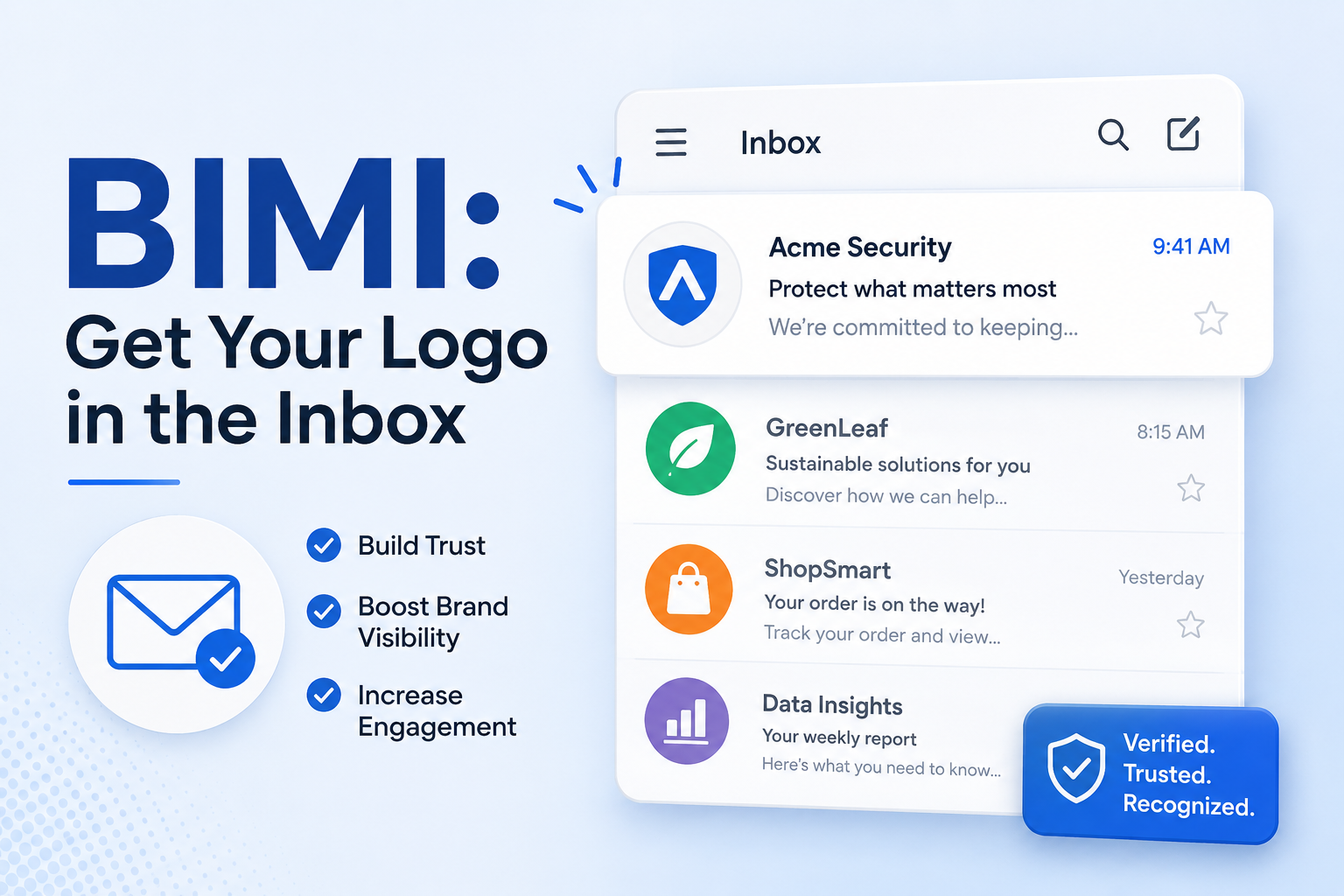
Open your Gmail inbox right now and scroll down. You will see two kinds of senders. Some show a generic gray circle with a letter inside. Others show a crisp, full-color brand logo. The difference is not random, and it is not Gmail playing favorites. It is BIMI — and if your business cares about brand trust, deliverability, and standing out in a crowded inbox, you should be paying attention.
BIMI is the email standard that turns your verified domain into a visible logo across every major mailbox provider. It is the email equivalent of the blue checkmark on social media: a publicly verifiable signal that the message is genuinely from who it claims to be. And in 2026, it is finally mature enough that every serious brand should be deploying it.
This guide explains exactly what BIMI is, what it requires, how to deploy it correctly, and why it is one of the highest-leverage email investments you can make this year.
What Is BIMI?
BIMI stands for Brand Indicators for Message Identification. It is an open standard that lets a domain owner publish a logo and have that logo displayed in supporting mailbox providers’ inboxes next to every authenticated message from the domain.
Mechanically, BIMI is a DNS record that points to two things: a specially formatted SVG file of your logo, and (in most cases) a digital certificate proving you have the legal right to display that logo. When a supporting inbox provider receives a message that passes authentication, it looks up your BIMI record, fetches your logo, and displays it next to the message in the recipient’s inbox view.
The result is striking. Where every other “noreply@” message in the inbox shows a generic placeholder, your messages show your actual brand. Customers recognize you instantly. Phishing impersonations stand out immediately, because the attacker cannot produce a valid BIMI logo against your domain.
Why BIMI Matters Now
Three things changed between 2022 and 2026 that turned BIMI from a curiosity into a strategic priority.
Apple Mail joined the party. In late 2023, Apple Mail on iOS, iPadOS, and macOS began rendering BIMI logos with Verified Mark Certificates. Combined with Gmail and Yahoo Mail (which adopted BIMI earlier), this means BIMI logos now display across the majority of email clients used in North America and Europe.
Common Mark Certificates lowered the bar. Originally, BIMI required a Verified Mark Certificate (VMC), which required a registered trademark — a serious bureaucratic hurdle for many small and mid-sized businesses. In 2023, Entrust launched the Common Mark Certificate (CMC), which uses prior-use evidence instead of trademark registration. BIMI is no longer just for trademarked enterprises.
The trust gap widened. As phishing and AI-generated impersonation have exploded, consumers have grown more skeptical of any unbranded email. A logo in the inbox is no longer cosmetic; it is the difference between “this looks legitimate” and “this might be a scam.” Studies from BIMI-supporting providers have shown open-rate lifts of 10 to 20 percent and significant gains in click-through and reported trust after BIMI deployment.
What BIMI Actually Requires
BIMI has the steepest prerequisites of any email standard, and this is the single biggest reason most domains do not have it. The good news is that the prerequisites are themselves things every business should have anyway.
A DMARC policy at enforcement. BIMI only works if your domain is at p=quarantine or p=reject — p=none is explicitly disqualified. If you have not yet completed your DMARC rollout, that is the first step. BIMI is the reward for finishing the DMARC journey, not a shortcut around it.
An SVG Tiny Portable/Secure logo. BIMI does not accept any SVG. It requires a specific profile called SVG Tiny 1.2 with the Portable/Secure constraints — a minimal subset designed to render consistently across every email client without security risks. This means no scripts, no external references, no animations, square aspect ratio, and a tightly defined set of allowed elements. Most logos need to be converted by a designer or a specialized tool before they will validate.
A Mark Certificate (for most providers). Gmail and Apple Mail both require a digital certificate proving the logo legitimately belongs to your brand. There are two flavors:
A Verified Mark Certificate (VMC) is issued by DigiCert or Entrust to organizations that own a registered trademark on the logo. It typically costs $1,000 to $1,500 per year per certificate.
A Common Mark Certificate (CMC) is issued by Entrust to organizations that can demonstrate prior use of the logo without a registered trademark. It carries the same per-year cost range. Apple Mail accepts both VMCs and CMCs; Gmail accepts both as of 2024.
Yahoo Mail and Fastmail will display BIMI logos without any certificate, but the major providers your customers actually use will not.
A BIMI DNS record. This is the easy part — a single TXT record at default._bimi.yourdomain.com that points to your SVG and your certificate. Once everything else is in place, this is a five-minute task.
How BIMI Works End to End
When a recipient’s mailbox provider receives a message from [email protected], the BIMI flow looks like this.
The provider first runs the normal DMARC check. If DMARC fails or if your DMARC policy is p=none, BIMI evaluation stops immediately — no logo will be shown.
Assuming DMARC passes, the provider looks up default._bimi.yourdomain.com in DNS and reads your BIMI record. The record contains a URL to your SVG logo and, optionally, a URL to your Mark Certificate.
The provider fetches the SVG, validates that it complies with the SVG Tiny PS profile, fetches the certificate (if required), and validates the certificate’s chain of trust and that it corresponds to the domain and the SVG.
If everything checks out, the provider caches the logo and renders it in the inbox view alongside the message. The recipient sees your brand logo. Every subsequent message from your domain reuses the cached logo until the certificate or SVG changes.
The entire process is invisible to senders. You publish once, and every supporting inbox in the world starts rendering your logo. Updates propagate automatically when you change the DNS record.
Step-by-Step BIMI Deployment
Here is the practical sequence for a real BIMI rollout.
Step one: confirm DMARC enforcement. Pull up your DMARC record and verify it is at p=quarantine or p=reject. If it is at p=none, complete the DMARC rollout first — there is no point investing in BIMI infrastructure that will not render.
Step two: prepare your SVG. Take your highest-quality brand mark (not your full wordmark — BIMI logos display in a small circular space, so a centered mark works best) and have it converted to SVG Tiny PS 1.2. Validators are available from the BIMI Group and from certificate authorities. Common issues include non-square viewBoxes, embedded raster images, gradients with unsupported syntax, and forbidden elements like <text> or <script>.
Step three: choose your certificate path. If your brand mark is a registered trademark in a supported jurisdiction (US, EU, UK, Canada, Australia, India, Japan, and others), apply for a VMC through DigiCert or Entrust. If you do not have a registered trademark but can demonstrate prior use (at least 12 months of public commercial use, with evidence), apply for a CMC through Entrust. Either certificate process typically takes one to four weeks and involves identity verification of the requesting organization.
Step four: host the SVG and certificate. Both files need to be hosted at HTTPS URLs on a domain you control. Many organizations put them at https://yourdomain.com/bimi/logo.svg and https://yourdomain.com/bimi/vmc.pem. Make sure the URLs are publicly accessible without authentication.
Step five: publish the BIMI DNS record. Add a TXT record at default._bimi.yourdomain.com with this format:
v=BIMI1; l=https://yourdomain.com/bimi/logo.svg; a=https://yourdomain.com/bimi/vmc.pem
The l= tag points to your logo. The a= tag points to your certificate. Both are required for Gmail and Apple Mail.
Step six: validate and wait. Use a BIMI validator to confirm your record parses correctly, your SVG validates, and your certificate chain is valid. Then send yourself a test email from the domain and check Gmail, Yahoo, and Apple Mail. Mailbox providers cache aggressively, so it can take 24 to 72 hours for logos to start appearing widely.
Common BIMI Mistakes
A few traps catch most first-time BIMI deployers.
Skipping DMARC enforcement. This is the number-one cause of “I set up BIMI and nothing shows up.” BIMI without DMARC at p=quarantine or p=reject is silently disabled by every supporting provider. There is no error message, no warning, just no logo.
Using a non-square logo. BIMI requires a square SVG with viewBox="0 0 X X" where the width and height are equal. Rectangular logos either fail validation outright or get cropped unpredictably in different clients.
Embedding raster images in the SVG. A common shortcut is to wrap a PNG in an SVG container. BIMI rejects this — the SVG must be true vector content with no embedded <image> elements.
Forgetting the certificate. Yahoo will show your logo with just the SVG and the DNS record, which can lull deployers into thinking BIMI is working when in reality Gmail and Apple Mail are silently ignoring you. Test in all three providers before declaring victory.
Letting the certificate expire. Mark Certificates are annual. When they expire, your logo disappears overnight from every supporting inbox. Calendar it; treat it like a TLS certificate.
Subdomain blind spots. Your default._bimi.yourdomain.com record covers the root domain, but mail from newsletter.yourdomain.com or support.yourdomain.com needs its own BIMI record (and its own aligned DMARC policy). Brands with multiple sending subdomains often see logos on some streams and not others.
The Business Case for BIMI
The pure marketing argument for BIMI is strong: more recognition, more opens, more trust, more clicks. Internal data from large mailbox providers has consistently shown measurable lifts when brands deploy BIMI correctly, and the brand-recall effect of seeing a logo every time a recipient sees your name in an inbox is hard to overstate.
But the more interesting argument is defensive. Once your customers have learned to associate your logo with your emails, the absence of that logo becomes a phishing signal. A scammer impersonating your domain cannot replicate your BIMI logo because they do not control your DMARC alignment or your Mark Certificate. The bad messages look bare; the legitimate ones look branded. Over time, your customers’ eyes learn to filter for you without any conscious effort.
The cost is real but bounded. A Mark Certificate runs $1,000 to $1,500 a year. An SVG conversion is a one-time designer task, typically under $500. DNS publication is free. For a brand sending any meaningful volume of email — transactional, marketing, or support — the return is straightforward to justify.
Where to Go From Here
If your domain is not yet at DMARC enforcement, that is the only thing to focus on right now. BIMI is the prize for finishing the DMARC journey, and skipping ahead to BIMI without DMARC at p=quarantine or higher will not work.
If your DMARC is at enforcement, BIMI is a six-to-eight-week project: SVG preparation, certificate application, hosting, DNS publication, validation. The cost is modest. The competitive advantage of being the only logo in a sea of gray circles is large — and it shrinks every quarter as more brands deploy.
The inbox is becoming a more visual, more brand-aware surface every year. The companies that show up as a logo will accumulate trust. The ones that show up as a generic placeholder will accumulate doubt. BIMI is how you choose which group you belong to.
Stay in the loop
Get notified when we publish new email security insights.